
European Banking Authority (EBA)
The EBA Guidelines on outsourcing arrangements expect financial entities to keep a clear record of what they outsource, on what terms, and who watches over it. With European Banking Authority (EBA) switched on, your contracts carry exactly those questions, the contracts in scope get their own tab, and you can produce the outsourcing register itself as a four-sheet Excel workbook.
EBA is set per contract. It is on when EBA is part of your contract with us — if it is not and you need it, contact sales@3rdrisk.com.
Overview
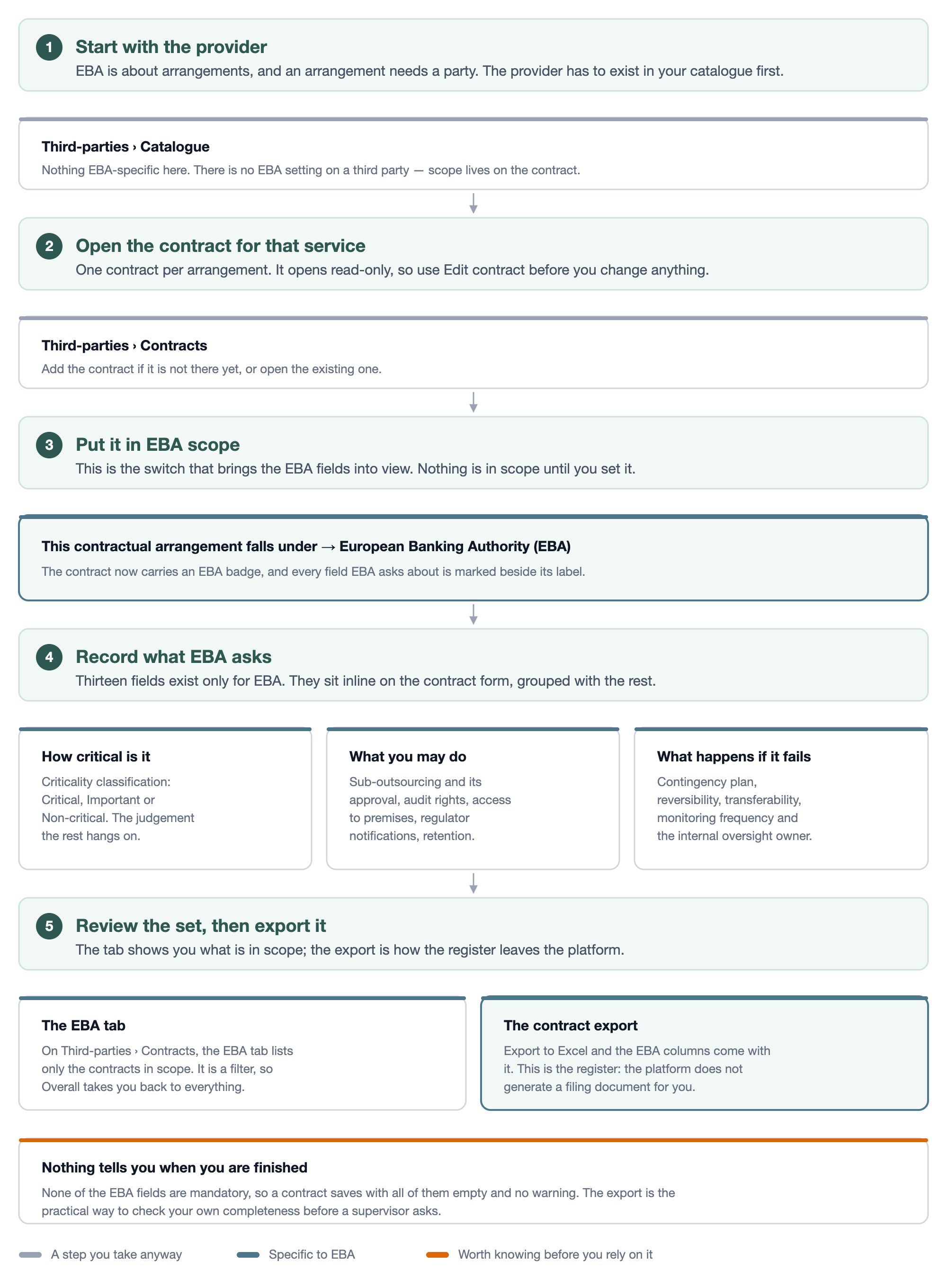
Four things to know before you start:
- Scope is per contract. You mark each arrangement individually; nothing is in scope by default.
- The fields sit inline on the contract form, marked beside the label, not on a separate tab.
- The register is a separate export. Alongside the ordinary contract export there is an EBA outsourcing register export built to the shape the Guidelines describe.
- The register tells you what is still missing. Every row carries a Missing register fields column, and the cover sheet counts how many rows are incomplete. Nothing blocks you from saving an empty field, but you can see the gaps.
1. Put a contract in EBA scope
- Navigate to: Left menu: Third-parties, then Contracts.
- Open the contract and click on Edit contract.
- In This contractual arrangement falls under, select European Banking Authority (EBA).
- Fill in the EBA fields that appear.
- Click on Save.
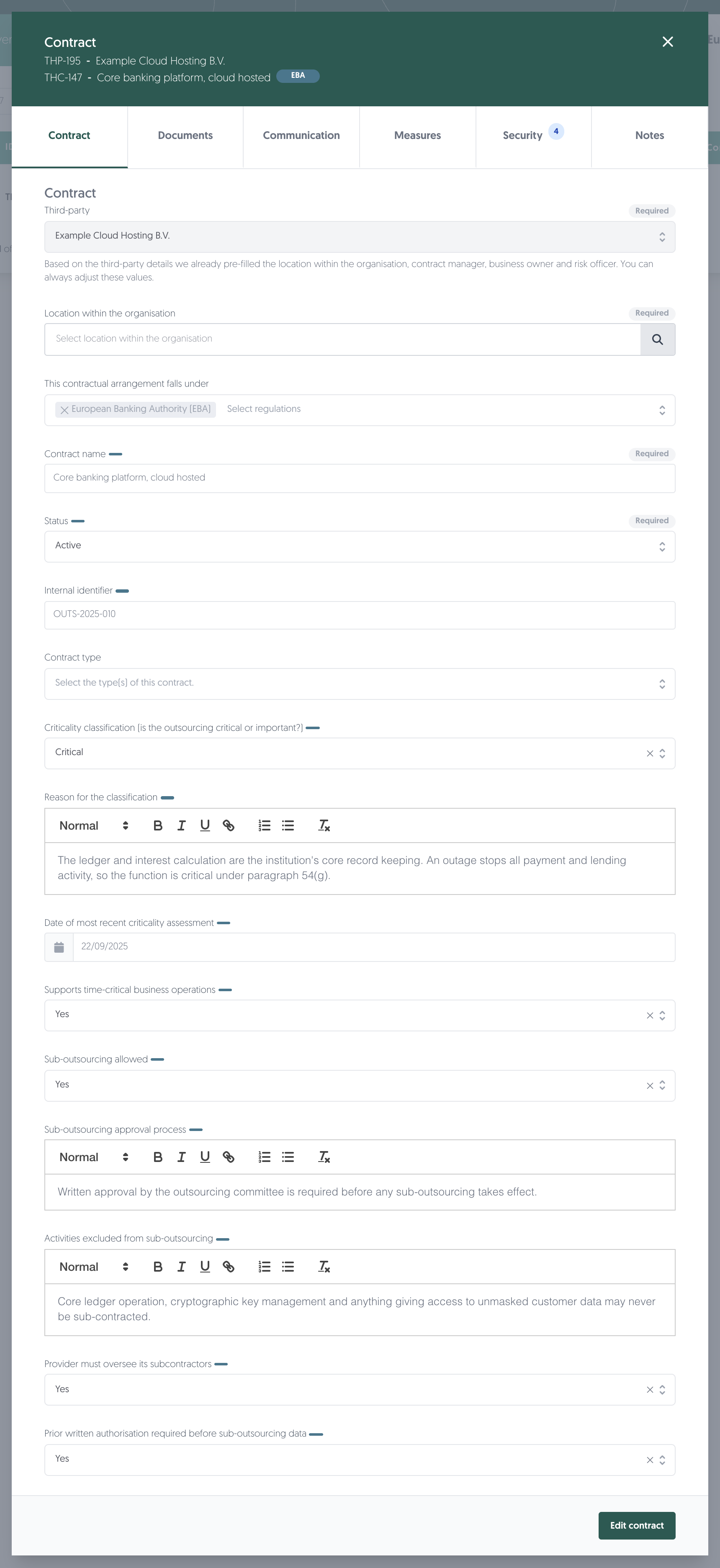
Once it is in scope the contract carries an EBA badge in the header, and every field EBA asks about is marked with a small badge next to its label. Hover a marker to see which regulation is asking.
Note: the contract opens read-only. Edit contract in the bottom right puts it into edit mode.
Note: the field accepts more than one regulation. If your platform also runs DORA, a contract can fall under both, and a field both ask for simply carries two markers. Learn more: Digital Operational Resilience Act (DORA)
2. The fields EBA adds
They are grouped on the form with the rest of the contract detail, under headings such as Contractual safeguards and Stakeholders.
How critical the arrangement is
Field | What it records |
|---|---|
Criticality classification (is the outsourcing critical or important?) | Critical, Important or Non-critical. This is the judgement everything else hangs on. |
Reason for the classification | Why you reached that judgement. Free text with formatting. |
Date of most recent criticality assessment | When the classification was last reviewed. |
Approved by | The person who approved the arrangement, picked from your users. |
Approved by (decision-making body) | Use this instead when a committee approved it rather than a named person. One or the other, never both. |
Supports time-critical business operations | Whether an outage stops something that cannot wait. |
Personal data transferred | Whether personal data are transferred to the provider. Note that this is not the same question as whether a data processing agreement exists. |
Audit
Field | What it records |
|---|---|
Date of most recent audit | When this arrangement was last audited. Not a penetration test or a continuity test. |
Date of next scheduled audit | When the next audit is planned. |
Where the data sits
Field | What it records |
|---|---|
Location of the data at rest | The country where the data is stored. |
Location of management of the data | The country from which it is managed and processed. |
Cloud service model | IaaS, PaaS, SaaS or Not applicable. |
Cloud deployment model | Public, Private, Community, Hybrid or Not applicable. |
Note: for a contract you are creating, these four appear in a Data and location group on the form itself. On a contract you are editing they live on the Security tab. Same fields, same values.
What the provider is allowed to do
Field | What it records |
|---|---|
Sub-outsourcing allowed | Whether the provider may subcontract at all. |
Sub-outsourcing approval process | How you approve a subcontractor when they may. |
Regulatory access rights clause | Whether the contract grants your regulator access. |
Right to audit clause | Whether you may audit the provider: Yes, No or Upon request. |
Access to premises, systems, and data clause | The access you and the authorities have, and on what notice. |
Notification obligations to regulator | Whether you must notify the regulator before entering or ending this arrangement. |
Retention period of contract and audit trail | For how many years the contract and its audit trail are kept. A number of years. |
The conditions on sub-outsourcing
These seven only apply once Sub-outsourcing allowed reads Yes, and they stay switched off until it does. Setting it back to No does not erase what you already entered — the answers are kept and simply left out of the register.
Field | What it records |
|---|---|
Activities excluded from sub-outsourcing | Which parts may never be subcontracted. |
Provider must oversee its subcontractors | Whether the provider stays accountable for what it subcontracts. |
Prior written authorisation required before sub-outsourcing data | Whether the provider must ask before subcontracting data processing. |
Notification obligation for planned sub-outsourcing | Whether the provider must tell you in advance. |
Notification period (days) | How much notice. Only used when there is a notification obligation. |
Right to object to intended sub-outsourcing | Whether you may object, must give explicit approval, or neither. |
Right to terminate on undue sub-outsourcing | Whether you may terminate if the provider subcontracts improperly. |
Contractual safeguards
Field | What it records |
|---|---|
Agreed service levels | The quantitative and qualitative targets, including availability, response and recovery. |
Mandatory insurance required | Whether the provider must insure against certain risks. |
Level of insurance cover | The amount and its basis. Only used when insurance is required. |
Data accessible on provider insolvency, resolution or discontinuation | Whether you can still reach your own data if the provider fails. |
How the data remains accessible | The arrangement that secures it, an escrow for example. Only used when the answer above is Yes. |
Obligation to cooperate with competent and resolution authorities | Whether the provider must cooperate with your authorities. |
Reference to resolution authority powers (BRRD) | Whether the contract refers to Articles 68 and 71 of Directive 2014/59/EU. |
Substantive obligations under Article 68 BRRD | Which obligations are identified as substantive. Only used when the reference above is Yes. |
What happens if it goes wrong
Field | What it records |
|---|---|
Contingency plan in case of provider failure | What you do if this provider stops delivering. |
Reversibility arrangements | How the service comes back in-house or moves on. |
Transferability of services and data | Whether services and data can move to another provider: Yes, No or Partially. |
Who keeps an eye on it
Field | What it records |
|---|---|
Frequency of performance monitoring/review | Monthly, Quarterly, Annually or Upon request. |
Internal owner responsible for oversight | The person accountable for overseeing this arrangement, picked from your users. |
EBA also asks for two roles on the contract that you may not be filling in today: a data protection officer and a legal officer, alongside the contract manager, business owner and risk officer.
Note: the free-text fields with formatting let you paste the relevant clause straight from the contract.
Subcontractor details
Pick the subcontractors under Subcontractors, and a row appears for each one so you can record where it sits.

Column | What it records |
|---|---|
Country of registration | Where the subcontractor is registered. Leave it empty and the register uses the country on the third-party record itself, which the placeholder shows you. Fill it in only to record a deliberate exception. |
Country of provision | Where this subcontractor performs the service for this contract. |
Location of the data | Where this subcontractor holds the data for this contract. |
Note: the last two belong to this contract. The same provider can serve two contracts from two countries, so they are recorded per contract rather than on the provider.
3. Find the contracts in scope
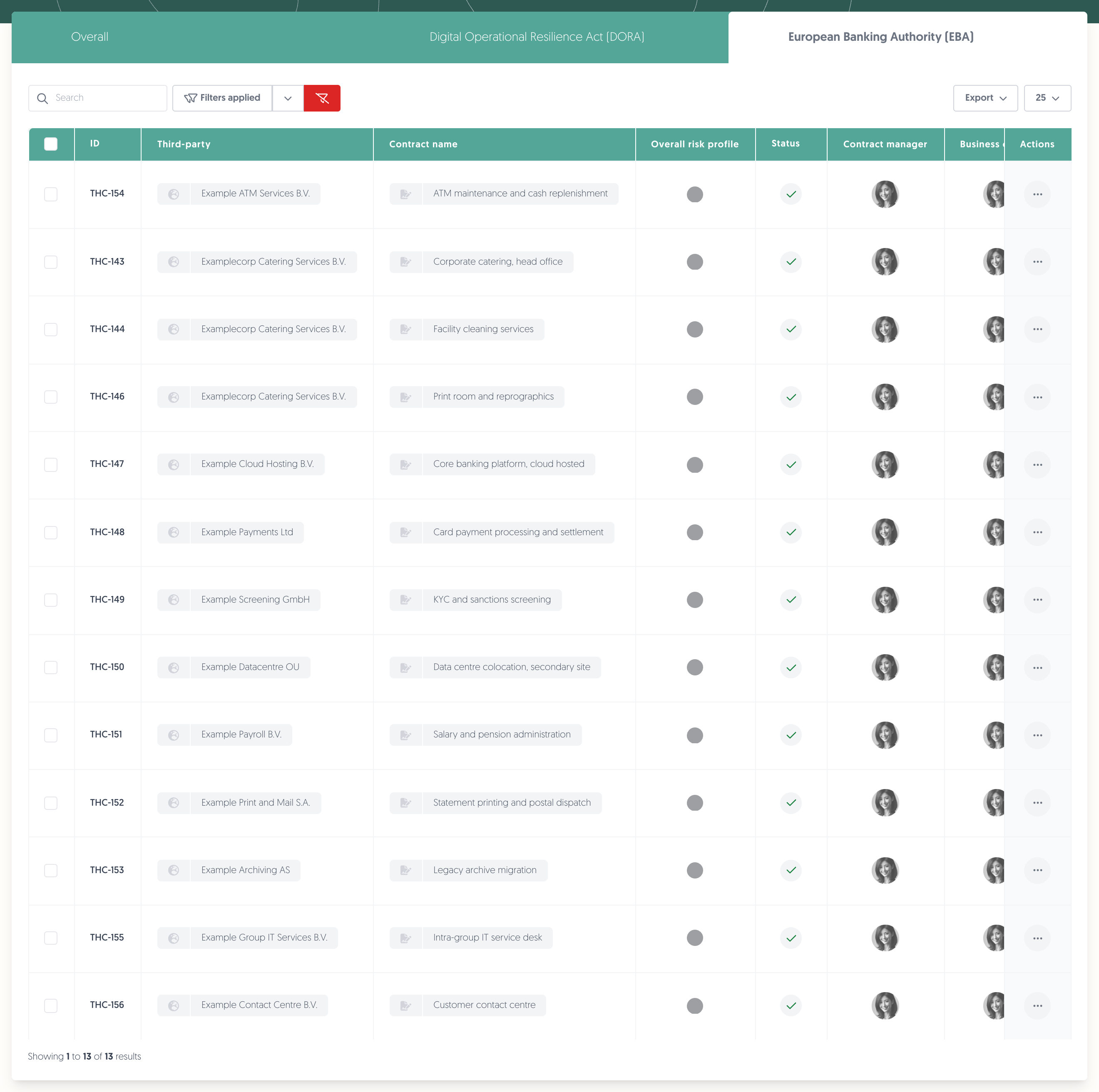
The contract list has a tab per active regulation. Click on European Banking Authority (EBA) to see only the contracts in scope. The tab is a filter, so Filters applied turns red while it is active — Overall takes you back to everything.
Note: the tabs only appear when there is more than one to show. If EBA is your only regulation, the list simply shows everything.
Note: there is no EBA tab on the third-party catalogue. Scope belongs to the contract, so that is where you filter it.
4. Export the outsourcing register
This is the register itself, built to the shape the Guidelines describe rather than to the shape of the import template.
- Navigate to: Left menu: Third-parties, then Contracts.
- Click on Export, then on EBA outsourcing register.
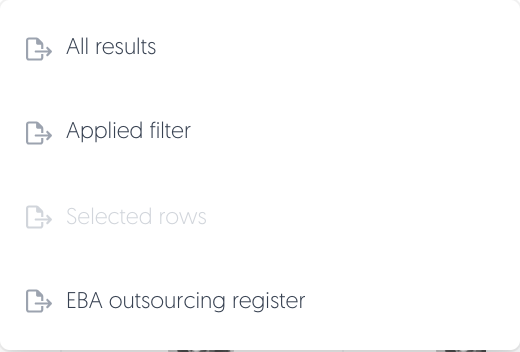
The export is queued and arrives as a download when it is ready. It covers the list as it stands: all EBA arrangements, or the applied filter, or the rows you selected — and the cover sheet records which of the three it was.
Sheet | One row per | What it holds |
|---|---|---|
Cover | — | Who produced it, when, the scope, and the counts: arrangements, critical or important, subcontractors, and how many rows are still incomplete. |
All arrangements | Arrangement | The provider's identity and address, the dates and notice periods, the outsourced function, where the data sits, and the criticality judgement. |
Critical or important | Critical or important arrangement | The additional items the Guidelines ask for only when an arrangement is critical or important: the entities using it, the risk assessment, who approved it, the audit dates and the substitutability questions. |
Subcontractors | Subcontractor | One row per subcontractor of a critical or important arrangement, with its country of registration, country of provision and data location. |
Missing register fields on the first two sheets names, per row, the columns the Guidelines require and that are still empty. That column is how you find the gaps before a supervisor does.
Note: a sheet with no rows is still written, with its headings, so you can tell it was produced and was empty rather than wonder whether it failed.
5. Fill the fields from the agreement
If you upload the signed agreement while creating a contract, the contract analyser reads it and proposes answers for most of these fields, which you then accept or correct. Fields it can answer carry an AI marker.
The analyser runs while you are creating a contract, not afterwards. That is also why the Data and location fields appear on the create form and move to the Security tab once the contract exists — so the analyser can reach them.
Learn more about the analyser: Contract catalogue
6. Import and export the fields
With EBA switched on, the contract import template grows an EBA section: a falls_under_eba column taking Yes or No, plus one column per EBA field, with drop-downs where the field has fixed options. That is the fastest way to record a set of existing arrangements.
- Navigate to: Left menu: Third-parties, then Contracts.
- Download the import template, which now includes the EBA columns.
- Fill them in and upload the file.
Learn more about importing contracts: Contract catalogue
The ordinary contract export carries the same columns, which is the round-trip format. Use the EBA outsourcing register export instead when you want the register itself.
Permissions needed
Permissions needed: the permissions you already use to view and edit contracts. There is no separate EBA permission.
Known limitations
- You cannot switch EBA on yourself. It follows your contract with us; Configuration → Features only reports the state.
- Scope is per contract, and there is no EBA setting on a third party.
- None of the fields are mandatory. A contract in EBA scope saves with every EBA field empty and nothing warns you at the time. The register's Missing register fields column is where you see it.
- The register reports gaps, it does not enforce them. Nothing prevents an incomplete arrangement from being saved or exported.
- The fields sit inline on the contract form, marked beside the label, rather than on a tab of their own.