
Digital Operational Resilience Act (DORA)
The Digital Operational Resilience Act (DORA) requires financial entities in the EU to keep a Register of Information: a structured record of the ICT services they buy in, who provides them, under which contracts, and which business functions depend on them. The platform collects that information across the modules you already use and exports it in the format supervisors expect.
This article is the starting point. It explains the vocabulary, the order of work, and which article covers which part.
Note: this describes what the platform does. It is not legal advice on what your organisation must report — check your obligations with your own compliance function or supervisor.
Overview
DORA is switched on per platform as a regulation, and it is on when DORA is part of your contract. When it is on, DORA fields appear on the records that feed the register and the DORA: Register of information menu becomes available. If it is not part of your contract and you need it, contact sales@3rdrisk.com.
The register is built from four sources:
Source | What it contributes |
|---|---|
Organisation profile | Your own entity: LEI, name, country, type of entity, currency |
Organisation model | Your entities, branches and functions, and which functions are critical or important |
Third parties | The ICT providers in scope, with their identification codes |
Contracts | The contractual arrangements, their type, cost and reliance |
Nothing is included automatically. A third party or a contract is only part of the register once you have put it in DORA scope on that record.
The words you will meet
- Register of Information (RoI) — the file you submit. In the platform it is produced by the export.
- DORA scope — the setting on a third party or contract that includes it in the register. Off by default.
- Reference date — the date the register describes, normally the end of the reporting period. You choose it when exporting.
- LEI — Legal Entity Identifier, a 20-character code. The platform verifies it against the public GLEIF register, including whether the registered legal name matches the name you hold.
- Entity, branch, function — the three organisation-model element types DORA uses. Functions are what you assess for criticality.
- DORA scope switch — on a third party it reads as a question: Does this third party qualify as an ICT third-party service provider under DORA?
- Reporting tables — the sections of the register, numbered
RT_01.01and upwards in the Excel export andB_01.01and upwards in the xBRL-CSV export.
The order of work
- Have DORA included in your contract — that is what switches it on.
- Complete your organisation profile — LEI, name, country, type of entity and currency.
- Build out your organisation model — entities, branches and functions — and record which functions are critical or important.
- Put the third parties that provide ICT services in DORA scope, and give them an identification code.
- Put the contracts for those services in DORA scope, and complete their DORA fields.
- Run the health check and work through whatever it reports.
- Export the Register of Information, choosing your reference date.
- Submit the exported file to your supervisor, through their own channel.
- If the review raises findings, correct the data and export again — the register is a cycle, not a one-off.
The health check is the tool that tells you where you are, so most people work steps 2 to 5 with it open.
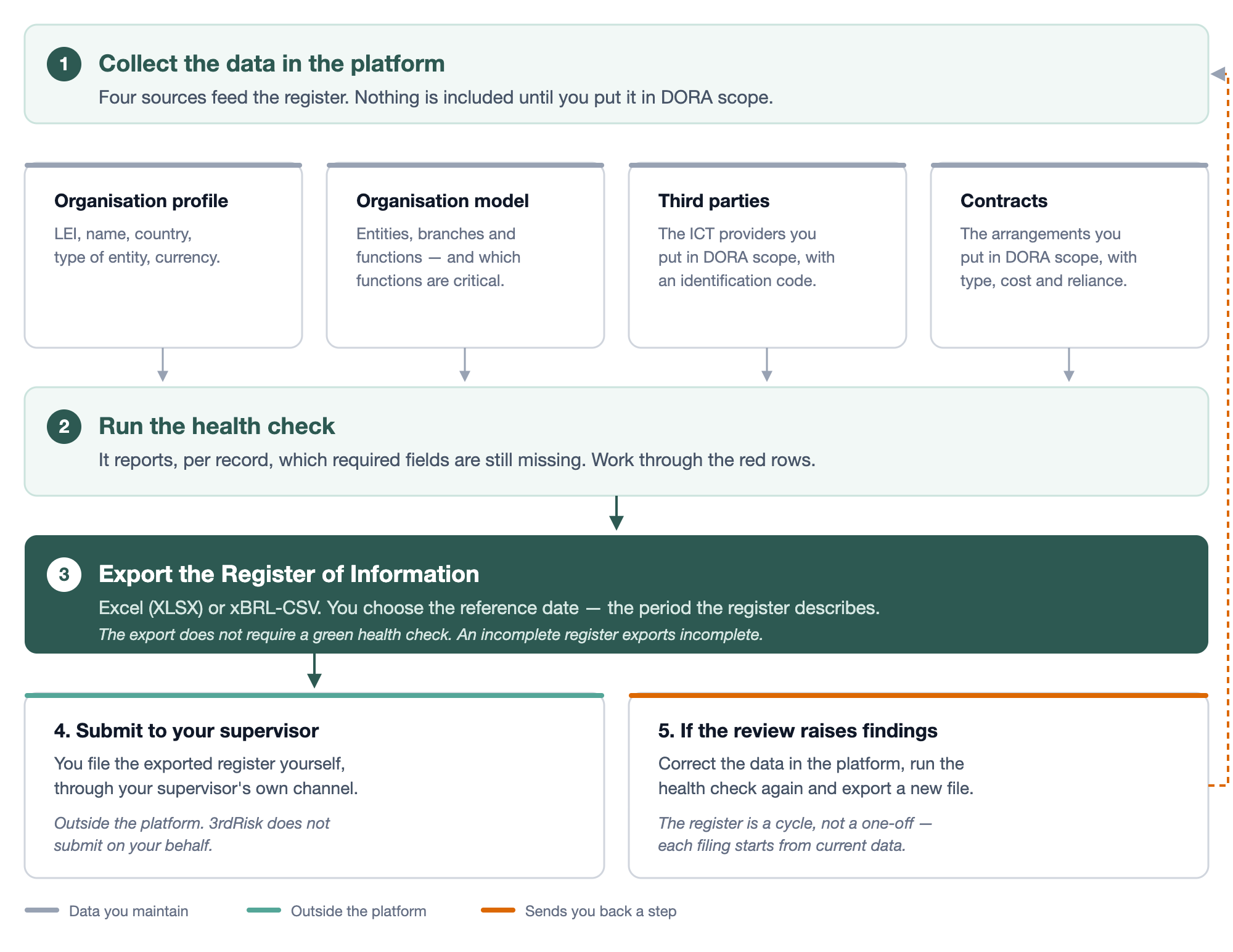
Stages 1 to 3 in the diagram happen in the platform. Submitting is not one of them: you file the exported register with your supervisor yourself, through their own channel, and 3rdRisk does not submit on your behalf.
The parts
Four articles, in the order you would work through them. Each one links back here.
Article | What it covers | Read it when |
|---|---|---|
Whether DORA is on, the organisation profile, and the organisation model: entities, branches and functions — including how a function is assessed | You are setting DORA up, or the health check flags your own entity or model | |
Putting an ICT provider in DORA scope, the fields the register needs, and how a LEI is verified against GLEIF | You are adding providers, or a LEI will not validate | |
The DORA fields on a contract, and putting a contract in DORA scope | Your providers are in scope but their contracts are missing from the register | |
Reading the four validation blocks, and producing the file in Excel or xBRL-CSV | You want to know what is still missing, or you are ready to file |
There is also a field-by-field reference, for when you need to trace a single cell in the exported file back to the platform: Reference: platform fields to Register of Information tables
If your platform also has EBA switched on, the same contracts can fall under both regulations at once. EBA asks a different set of questions about the same arrangements, and has no register export of its own.
Learn more: European Banking Authority (EBA)
Start with the health check if you already have data in the platform: it tells you which of the other three articles you actually need.
Known limitations
- Nothing is in scope by default. Third parties and contracts each need their DORA setting switched on individually.
- A complete health check is not a compliant filing. It confirms the platform's required fields are filled, not that your register satisfies your supervisor.
- LEI verification depends on the public GLEIF register. If GLEIF holds a different legal name than you do, the check fails until one of them is corrected.